Layout
The Layout in RagTime is the stripping desk, which allows positioning all components, such as text, images and tables, in the same way as they will appear after printing. This dispenses with the need for a separate print preview. You will always work in this special page preview.
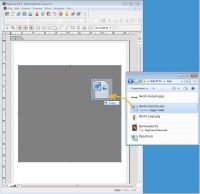 To insert text components from the desktop into a RagTime document, just drag & drop the file icon of the desired text document into a frame within the layout page. This simple drag & drop technique also works with placing pictures and tables.
RagTime can import text, tables and pictures with a maximum of included information.
- Texts come with formatting, e.g. character set, size and style. When importing, a preceding dialog allows you to decide which character encoding should be used. You will easily recognize a suitable encoding because the text is displayed in different encodings. Unexpected results with cross-platform collaboration on documents are history.
- Tables come with formulas and formatting.
- Pictures are included in the document either completely or via reference, with RagTime taking into account clipping paths and color profiles.
- Placed EPS and PDF files are printed in full vector graphics quality.
You can decide individually, how detailed and complete your document view should be. Chose a simplified view, which hides e.g. page boundaries, nonprinting items and special characters (blanks, paragraph ends, etc.). Or toggle the required items visible, to enable a more detailed document editing.

RagTime.de Development GmbH
Feldriethe 4
30826 Garbsen
Germany
Tel.: +49 5131 70 93 6-0
Contact us by e-mail