Images
At its simplest, pictures are imported in a RagTime document via drag & drop. Then you may adjust all properties individually. RagTime accepts the image formats TIFF, PNG, JPG, PDF, BMP, WMF, and EPS.
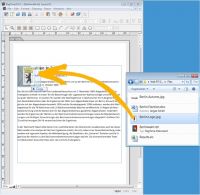 If – as in this example – the position in the layout for the picture to be placed has already been determined, do the following:
Drag a new picture container to the desired place in the layout page that fixes the position of the picture (and fix means fix). Then drag the picture from the desktop, or a folder, into the container. RagTime has a built-in color management, which meets the official ICC standard and that ensures highest output quality for all color components, and especially for pictures, in a document.
And with its exporting capabilities, RagTime is a versatile player in the great computer scenery. Complexly designed documents can be exported as HTML pages, for use on the Internet, or as a PDF document. Nowadays many print houses accept PDF as a standard format for handing in print data. Via the EPS export format, objects that were created with RagTime can easily be placed in other layout applications.

RagTime.de Development GmbH
Feldriethe 4
30826 Garbsen
Germany
Tel.: +49 5131 70 93 6-0
Contact us by e-mail