Windows “Smart App Control” blocks the installation of RagTime
10/12/2026
When upgrading, for example from Windows 10 to Windows 11, the Windows “Smart App Control” service is not enabled by default, and RagTime can be installed without any issues.
However, if you are doing a fresh installation of Windows 11, “Smart App Control” is enabled by default and blocks both the installation and the execution of RagTime:

To work around this issue, you must first disable this protection:
- In the Windows taskbar search box, type “Smart App Control”
- Change the setting from “On” to “Off”
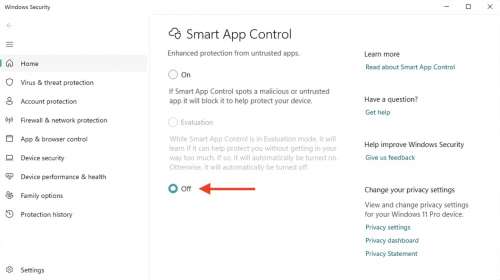
- Now close all settings windows and start the RagTime installation
Tips & Tricks


Sales News
Contact

RagTime.de Development GmbH
Feldriethe 4
30826 Garbsen
Germany
Tel.: +49 5131 70 93 6-0
Contact us by e-mail